
...and it allows to paste screenshots for apps that don't allow to paste directly.
Guido Günther
boosted

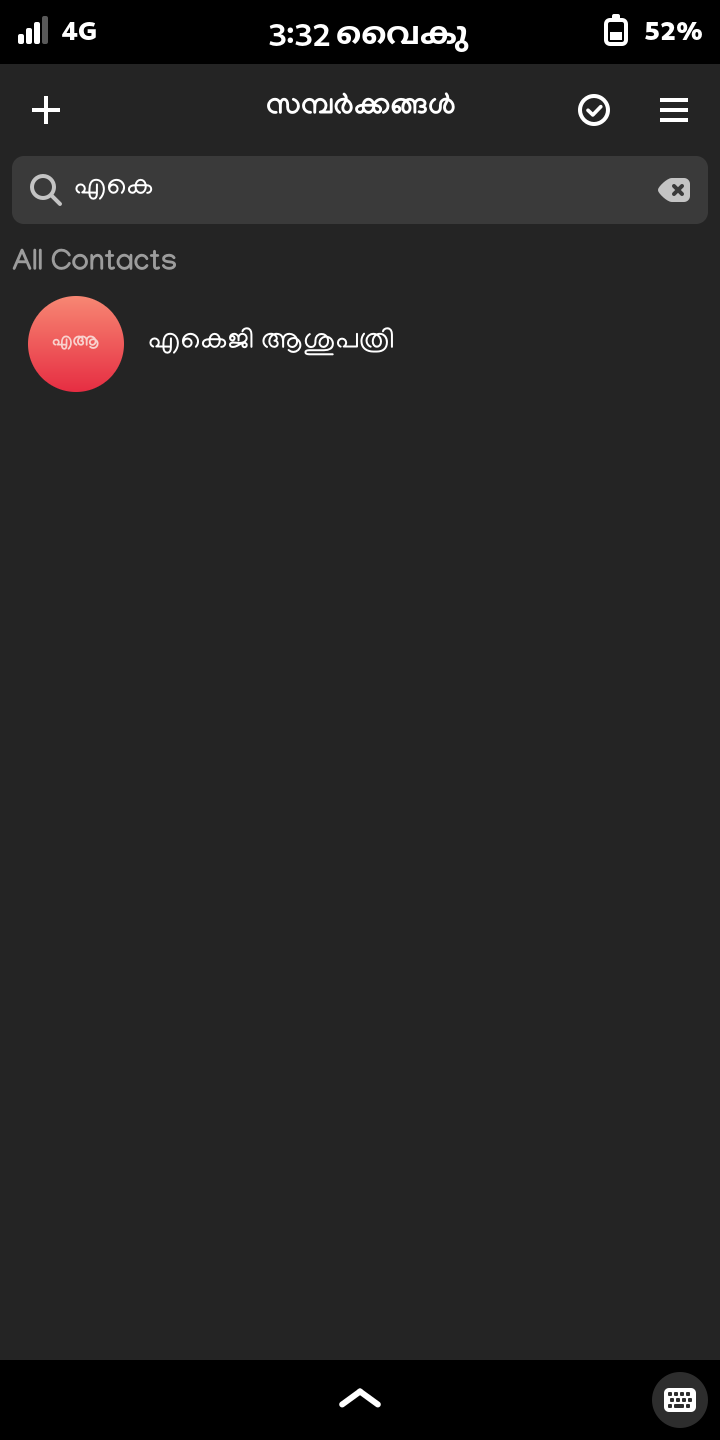
Thanks to @subins2000 Sadiq and @agx I can now type in Malayalam on my Librem 5.
A short look back at what happened around #phosh in 2023:
@pocketvj File a bug against the app 😃 (or maybe Droidian to pick one that works, depending on which app that is)
@pocketvj select/copy/paste works fine here. (Using phosh-osk-stub: https://gitlab.gnome.org/guidog/phosh-osk-stub). Otherwise I couldn't do a thing. I have CTRL-{,SHIFT}-{C,V} as keyboard shortcuts in the terminal layout so it's super quick.
@linmob The "not recorded" makes me a little sad 😢 . Have fun nevertheless!
Guido Günther
boosted

For everyone at #37C3 into #LinuxMobile and more broadly free software on phones in general: This session should be interesting: https://events.ccc.de/congress/2023/hub/en/event/smartphones-freedom-status-in-2023/
@jan_wagemakers Nice. I'm Also using mutt here on Mobile. To avoid having to store any credentials I'm using pkinit and the Librem5's smartcard reader. I then just need to enter the smartcard pin every once in a while which is simple with krb5-auth-dialog under #phosh (but works also on other mobile environments): https://honk.sigxcpu.org/con/Kerberos_authentication_on_the_Librem_5.html
@pocketvj Put the command in a shell script to get shell expansion. You can poke with "sh -c ..." but a script is so much nicer (and as a bonus you can invoke it from the command line too if it's in $PATH)
@pocketvj You can add a shell scripts that does
wl-paste > ~/Pictures/Screenshots/`date +"%Y-%m-%d_%H:%M:%S"`.png
(or s.th. more elaborate). Use that in a desktop file in
.local/share/applications
add that to phosh's favorites and hit it after the screenshot and it will put it in that folder
@pocketvj `wl-paste` always works (and make sure to file a bug against your favorite image-viewer if it doesn't support paste in 2023). Which reminds me that I still need to fix hydrogen.
There's also gnome-screenshot which saves to folders nicely. (Phosh itself currently does clipboard only)
@cas 🤩 (Like the phosh one too)
Guido Günther
boosted

New blog post: The Year 2023 in Retrospect https://christian-gmeiner.info/2022-12-26-end-of-year/
I've released #livi 0.0.5, a little video player mostly targeting mobile: https://gitlab.gnome.org/guidog/livi
Among other things we make better use of screen estate in landscape even when not fullscreen.
@federico3 add `devhelp` to that you can browse all the GTK related documentation quickly (including search) within a single UI.
Guido Günther
boosted


#Debian provides documentation packages for many libraries, languages and tools. Why I like it so much?
- No matter how good your uplink is, localhost is faster
- Sometimes connectivity is poor or absent (on planes, country-side etc)
- Grep is faster that any search engine
- You can save on battery and metered SIM data
- Debian removes privacy-breaching images, javascript, cookies, ads
- Installed documentation is always at the same version as the language/tool/library
Guido Günther
boosted

https://www.postfix.org/smtp-smuggling.html
"SMTP Smuggling" vulnerability in Postfix allows to spoof senders even in the presence of some DMARC checks. Configuration workarounds exist.
Also, a wholehearted f* you to SEC Consult, who sat on this since June and disclosed it to some closed-source vendors and MSPs, but could apparently not be bothered to give e.g. Postfix a heads-up, publishing this close to the holidays.
Boosts for awareness welcome.
Guido Günther
boosted

Check out this alternative on screen keyboard for Phosh:
https://puri.sm/posts/opportunistic-word-completion/?mtm_campaign=status_update&mtm_source=organic&mtm_medium=librem_social&mtm_content=ls-opportunistic-word-completion
#phosh #purism #MobileLinux